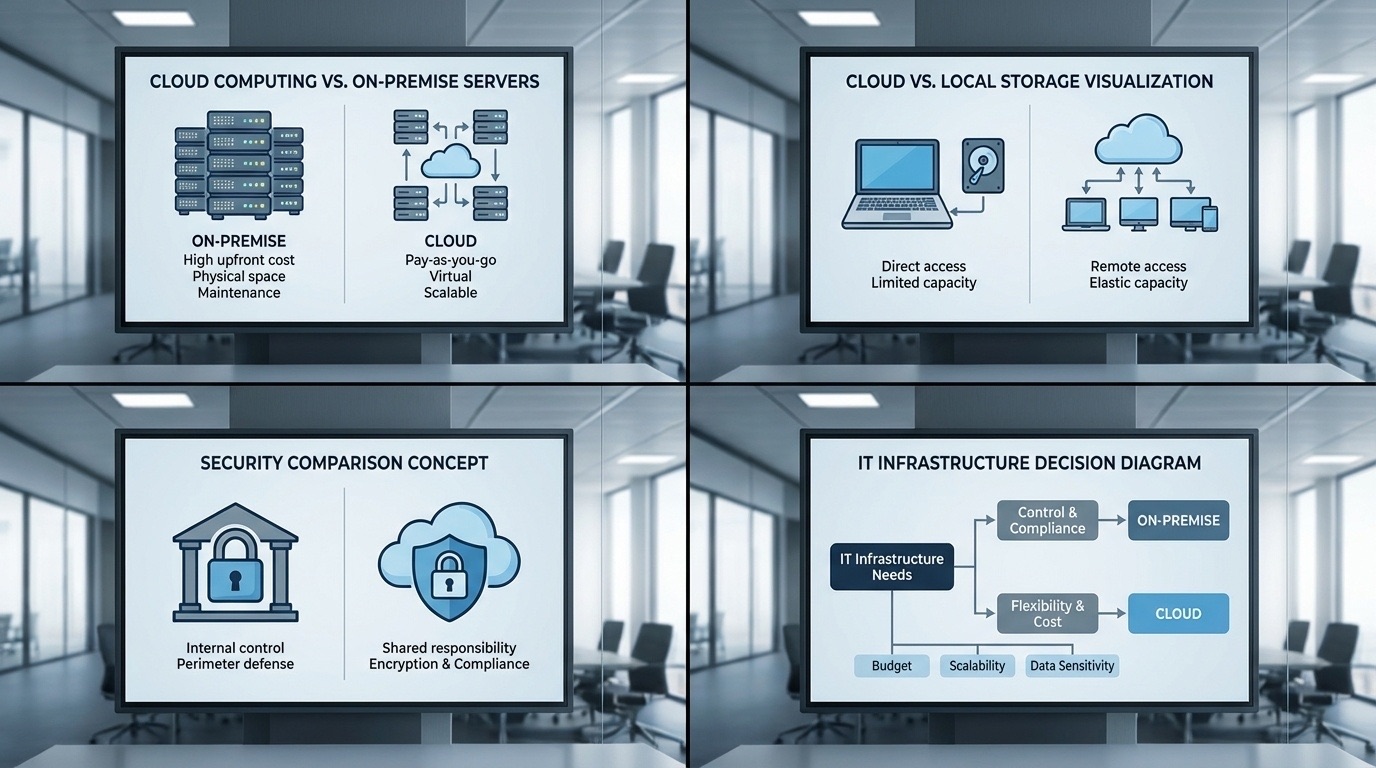
A cloud CMS spreads the cost of Digital Signage software over a per-screen subscription and leaves servers and updates to the provider; an on-premise CMS costs more up front, but gives you full control of your data and security, and the lowest latency. This comparison covers security, total cost of ownership and performance, looks at data location for Swiss organisations, and explains when a hybrid setup combining both makes sense.
On this page
Key takeaways
- Cloud CMS: a recurring per-screen subscription, instant scalability, automatic updates, minimal IT overhead
- On-premise CMS: a large up-front investment instead of a subscription, full control of your data, the lowest latency
- Swiss data sovereignty: on-premise keeps data on your own servers, under your direct control; with a cloud CMS, check where the data is hosted and which law applies
- Hybrid approach: a cloud dashboard with local media servers, which HYPERVISUAL often recommends for multi-site networks
Understanding the fundamentals
Your content management system forms the operational backbone of any Digital Signage deployment. Whether managing three screens in a single location or coordinating hundreds of displays across multiple countries, the hosting model you choose shapes everything from the initial investment to long-term scalability, and determines daily workflows, security posture, and total cost of ownership for years to come.
The Digital Signage industry has evolved dramatically, and it keeps growing: according to Grand View Research (June 2026 edition), the global Digital Signage market, valued at USD 31.1 billion in 2025, is expected to reach USD 58.4 billion by 2033, a compound annual growth rate (CAGR) of 8.2% from 2026 to 2033. On-premise installations were once the norm; today, cloud-based platforms are a common choice for new deployments. Yet this shift doesn’t mean on-premise solutions have become obsolete, particularly for European organisations navigating complex data protection requirements and industry-specific regulations.

How cloud CMS works
Cloud-based Digital Signage operates through software hosted on remote servers managed by the service provider. Users access the platform through any web browser, managing content, scheduling, and monitoring without installing local infrastructure.
The technical architecture typically involves media players at each display location that download content from cloud servers, cache it locally for playback, and report status back to the central platform. This design ensures displays continue operating even during temporary internet outages.
Key advantages of cloud CMS
Remote Management Anywhere: Manage your entire display network from any device with internet access. Update content for a Zurich retail location while travelling in Munich, or monitor screen status across all European branches from a single dashboard. Our case study of ten pop-up stores managed as one screen network shows this kind of central management in practice.
Predictable Monthly Costs: Cloud platforms operate on subscription models, typically priced per screen per month.
Automatic Updates and Maintenance: Software updates, security patches, and feature enhancements deploy automatically without IT intervention.
Instant Scalability: Adding new screens requires no additional infrastructure investment. Simply connect media players and assign licences.
Security analysis
Modern cloud CMS providers invest heavily in security infrastructure that many individual organisations cannot match. Enterprise-grade measures include ISO 27001 certification, SOC 2 compliance, end-to-end encryption, multi-factor authentication, and continuous security monitoring.
Reputable providers maintain dedicated security teams, conduct regular penetration testing, and implement automatic threat detection. For many organisations, cloud security exceeds what internal IT teams can achieve independently.
On-premise security advantages
Organisations with specific compliance requirements may require on-premise deployment. Financial services firms subject to FINMA regulations, healthcare providers managing patient data, or defence contractors with classified information often mandate on-premise infrastructure.
The key advantage: you define and control every security parameter. No reliance on third-party practices: your team implements and audits all protective measures.
Swiss data sovereignty considerations
Swiss organisations must take the requirements of the Federal Act on Data Protection (FADP) into account. For a cloud CMS, check where the data is hosted and which law applies: choose a Swiss-hosted option, or obtain contractual commitments on where the data is stored. With an on-premise CMS, the data stays on your own servers, under your direct control.
Total cost analysis
Cloud TCO components
Monthly subscription: billed per screen, at a rate that varies with the feature set and the provider. This is the line that dominates cloud TCO, and it scales in a straight line with the size of the fleet.
Setup: minimal, typically included or charged as a nominal one-time fee.
Hardware: media players only, a one-off cost per screen, identical whichever model you choose.
Maintenance: included in the subscription.
IT labour: minimal ongoing requirement.
Over a five-year horizon, cloud spending is almost entirely recurring: predictable, easy to budget, and proportional to the number of screens actually running.
On-premise TCO components
Software licence: a perpetual licence paid once, sized by the number of screens or by feature tier.
Server hardware: a one-off purchase whose size follows the scale of the deployment.
Media players: the same per-screen cost as in the cloud scenario; this line does not discriminate between the two models.
Installation and configuration: professional services, paid once, and the line most often underestimated.
Annual maintenance: a yearly fee, usually proportional to the licence cost and set by the provider.
The two cost curves therefore have different shapes: cloud is a straight line, on-premise a high step followed by a shallow slope. They cross somewhere, and where they cross depends on two variables only: how many screens you run, and for how many years. Below that point the cloud wins; beyond it, the up-front investment pays off. What the invoice never shows is the internal cost of running your own servers: updates, security, and the IT time that goes with them.
Performance comparison
Cloud performance characteristics
Cloud platforms excel at distributed content delivery. CDN infrastructure ensures consistent performance regardless of geographic spread. The platform reports the status of every player in real time, so problems anywhere in the network show up as they occur. Content updates propagate quickly to all locations.
On-premise performance characteristics
On-premise delivers the lowest latency for local content delivery. Video walls requiring frame-perfect synchronisation often perform better with local server infrastructure. Bandwidth costs remain internal rather than accumulating external data transfer charges.
The hybrid approach
A hybrid architecture combines cloud management with local caching of content. For multi-site deployments, HYPERVISUAL often recommends this configuration: a cloud dashboard for centralised control, with local media servers ensuring consistent playback.
Implementation recommendations
HYPERVISUAL helps Swiss and European organisations evaluate both approaches against their specific requirements. We weigh security requirements, budget constraints, scalability plans and operational capabilities before recommending an architecture. Where it fits, we also propose our own Digital Signage software, DATAVSN, developed by HYPERVISUAL and hosted in Switzerland. To compare platforms, see our comparison of Digital Signage software platforms.